Consent mode is the layer that sits between your cookie banner and your Google tags. It translates a visitor’s choice into signals the tags understand, and it decides what those tags are allowed to do once the choice is made.
Most write-ups compress the topic into a single sentence about a March 2024 deadline. That sentence is doing a lot of work, and it gets the requirement slightly wrong. So this guide walks through the four signals, the two implementation modes, and what the deadline actually applied to.
What Consent Mode Changes About Your Tags
Without consent mode, blocking a tag is binary. Your banner either fires the tag or it does not, and a refusal leaves you with nothing at all for that visitor.
Consent mode replaces that switch with a set of states. The tag still loads, reads the current consent state, and adjusts its own behaviour — writing cookies when permitted, and holding back when not. Your banner sets the state; the tag responds to it.
That distinction matters for how you build. The banner no longer needs to know which tags exist or in what order they fire. It just announces a state, and every Google tag on the page reacts the same way.
The Four Signals
Consent mode carries four parameters. Two came with the original release; two arrived when Google updated the framework in November 2023.
| Parameter | Added | What granting it permits |
|---|---|---|
analytics_storage | v1 | Analytics cookies — the client ID that lets sessions and users be counted properly |
ad_storage | v1 | Advertising cookies and similar identifiers used for measurement and remarketing |
ad_user_data | v2 | Sending user data to Google for advertising purposes |
ad_personalization | v2 | Using the data for personalised advertising, including remarketing audiences |
The split trips people up. A visitor can grant analytics while refusing advertising, so analytics_storage and ad_storage often hold different values on the same page view. Your banner needs categories that map cleanly onto that, which usually means separating statistics from marketing rather than offering one combined toggle.
Note also that the two v2 parameters govern use rather than storage. Granting ad_storage while denying ad_personalization is a coherent position: cookies may be written for measurement, but the resulting data stays out of personalised campaigns.
Basic and Advanced: The Choice That Decides Your Data
There are two ways to wire this up, and the difference is not cosmetic. It determines whether you get anything at all from visitors who refuse.
| Basic | Advanced | |
|---|---|---|
| When tags load | Only after the visitor interacts with the banner | Immediately, before the banner is answered |
| If consent is denied | Nothing is sent | Cookieless pings are sent — no identifiers |
| Conversion modelling | Not available for refusals | Available, since Google receives a signal |
| Main trade-off | Simpler to defend, larger blind spot | More data, more explaining to do |
Advanced mode is what Google recommends, because modelling needs some signal to work from. Basic mode is the conservative reading, and some legal teams prefer it precisely because no request reaches Google until a choice exists.
Pick deliberately rather than by default. Whichever your consent platform ships with is a decision someone made for you, and it is worth knowing which one you inherited.
What the March 2024 Date Covered
You will read that consent mode v2 became mandatory in March 2024. The date is real, but it attaches to something narrower than the sentence implies.
Google’s own help documentation ties that month to Customer Match: starting in March 2024, both consent fields must be set to granted for a Customer Match list to be usable in the EEA. That is a specific product with a specific gate.
The broader obligation is worded differently and has no countdown attached to it. To keep using measurement, ad personalisation and remarketing features, you have to collect consent from EEA users and pass those signals to Google. It is a condition of continued use rather than an event on a calendar.
The practical consequence is the same either way: if you serve EEA traffic and run Google advertising products, the v2 parameters need to be there. But when a stakeholder asks what happens on a particular date, the honest answer is that the enforcement is continuous, not a switch that flipped once.
Setting Defaults Before the Banner Loads
Consent mode works on a default-then-update pattern. You declare a starting state as early as possible, then push an update once the visitor chooses.
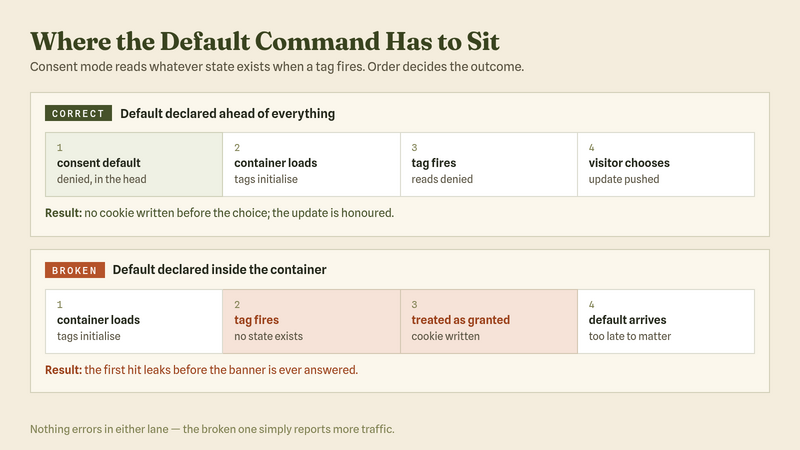
The default has to run before any Google tag fires. If a tag reads the page while no state exists, it behaves as though consent were granted, which is the failure you are trying to avoid.
Three things decide whether the defaults hold:
- Placement. The default command belongs in the head, above the container snippet — not in a tag that the container itself fires.
- Region scoping. Defaults can be set per region, so EEA visitors start denied while other markets follow a different policy. Google’s guidance is explicit that the values are yours to choose against your own policy.
- Persistence. A returning visitor’s stored choice must be replayed on the next page load. Otherwise every visit starts from the default and the banner reappears.
If you manage tags through a container, the ordering question is worth checking directly rather than assuming. Our guide to Google Tag Manager covers how firing sequence is controlled there.
Checking That It Works
Consent mode fails quietly. Nothing errors, reports keep filling, and the gap only shows up when someone compares numbers across regions.
Run this check on a clean browser profile with no stored choice:
- Load a page and stop. Do not touch the banner. Open the network panel and look at what already went out.
- Read the consent state on the outgoing request. Requests carry the current state, so you can confirm the defaults applied rather than trusting that they did.
- Check the cookie jar. With storage denied, no analytics or advertising cookies should have been written yet.
- Accept, then refuse on a fresh profile. Both paths need testing, because banners commonly handle the accept case correctly and mishandle the refusal.
- Reload after choosing. The stored choice should be replayed before the tags fire, with no second banner.
The debugging habits carry over from ordinary tag work. If you have not set that up, debugging analytics tracking covers the tooling.
What Your Reports Look Like After Refusals
With advanced mode running, Google fills some of the gap through behavioural modelling. The estimates only appear once the property earns them, and the conditions are specific.
Google publishes two thresholds that must both hold. A property needs at least 1,000 events per day with analytics_storage denied across a minimum of seven days, plus at least 1,000 daily users sending events with consent granted on at least seven of the previous 28 days.
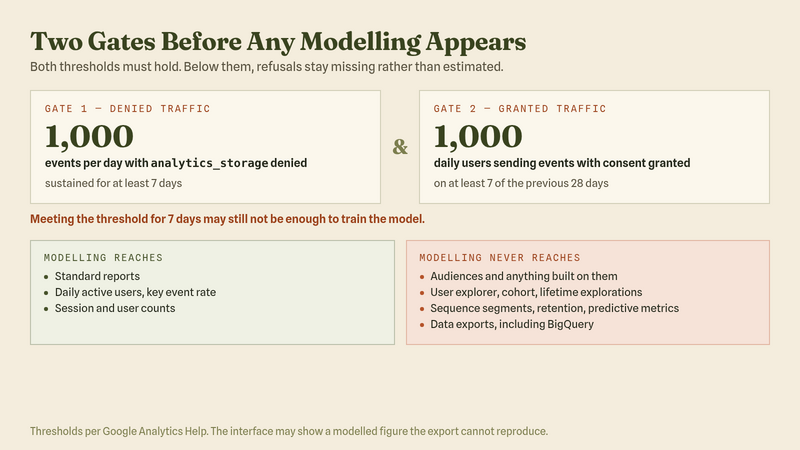
Smaller sites rarely clear that bar. If your traffic sits below it, refusals stay missing rather than being estimated, and advanced mode buys you less than the marketing copy suggests.
Even when modelling does kick in, it does not reach everywhere. Google lists several areas that cannot use modelled data at all:
- Audiences, and therefore anything built on top of them
- User explorer, cohort and user lifetime explorations
- Segments that use sequences, and retention reports
- Predictive metrics
- Data exports, including the raw BigQuery export
That last one catches teams by surprise. The interface shows a modelled figure, the export shows only observed rows, and the two disagree by exactly the amount that was modelled. Neither is broken — they answer different questions.
Where Teams Get It Wrong
Four mistakes account for most broken implementations, and none of them announce themselves in a report.
- Defaults set too late. The command lives inside the container instead of ahead of it, so the first tag reads an empty state and treats it as granted.
- One toggle for everything. A banner offering a single accept-or-reject cannot express the four parameters, so analytics gets discarded alongside advertising even when the visitor would have allowed it.
- Assuming the consent platform handled it. Certified platforms do update themselves, but only for tags they manage. Anything hard-coded in the theme sits outside that.
- Reading modelled numbers as observed ones. Advanced mode fills gaps with modelling, which is useful for trends and misleading if you quote it as a raw count.
The last one causes the most confusion internally. Modelled conversions belong in a trend discussion, not in a finance reconciliation, and saying so early saves an argument later.
Where to Go From Here
Consent mode is the plumbing, not the policy. It carries a decision your banner already made, so the quality of the setup depends on how well the banner expresses choices in the first place.
Start by opening a clean profile and running the five checks above against your live site. Most teams find at least one of the four mistakes on the first pass, and the defaults-too-late problem is usually the one hiding.
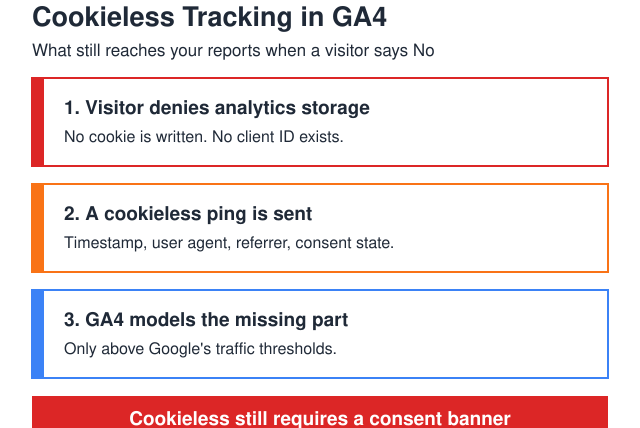
For the banner side of the setup, see how to set up cookie consent for Google Analytics. For what measurement still looks like once a visitor refuses, cookieless tracking covers what survives and what does not.

About the Author
Tom Bradley
Marketing analyst with 8+ years in web analytics. I’ve completed 150+ GA4 implementations and helped 50+ brands turn data into growth strategies. Every guide on Viewing comes from real projects and real problems I’ve solved.