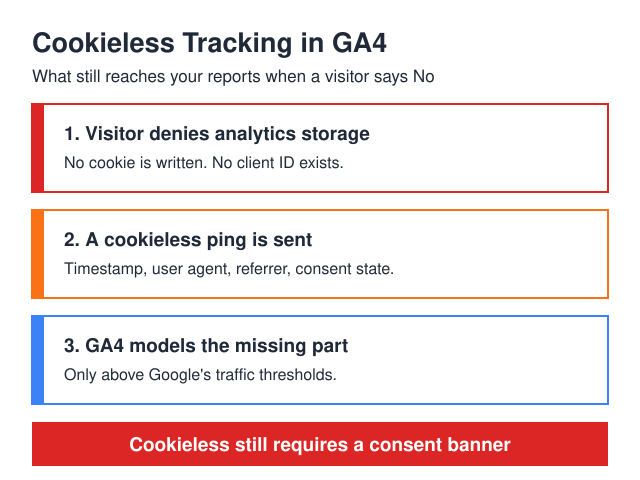
Cookieless tracking in Google Analytics 4 is Consent Mode v2 running in advanced mode. When a visitor denies analytics storage, your Google tags still load. Instead of a normal hit they send a cookieless ping — timestamp, user agent, referrer, a boolean consent state, and a flag for whether ad-click information appeared in the URL. No _ga cookie, no client ID, nothing that stitches two page views into one session. GA4 then estimates the missing part with behavioral and conversion modeling, but only if your property clears Google’s published thresholds: at least 1,000 events per day with analytics_storage='denied' for at least 7 days, plus at least 1,000 daily users sending events with analytics_storage='granted' for at least 7 of the previous 28 days. Below that, nothing gets modeled. And the biggest myth needs killing right now: cookieless does not mean consent-free. You still need a banner.
I’ve rebuilt consent setups on sites where a large share of EU visitors clicked reject. The pattern repeats — install a banner, watch sessions collapse, go hunting for a “cookieless” switch that restores the numbers. There isn’t one. There are mechanics that recover part of the signal, and losses you plan around instead of chasing.
If you haven’t built the banner yet, start with the companion piece on how to set up cookie consent for Google Analytics — it covers the legal side, CMP selection, and the banner itself. This article picks up where the banner ends.
Three unrelated things get thrown into one bucket. Separating them fixes most of the confusion.
1. A visitor denied consent. The one that matters for your reports. The user hit “Reject”, your CMP pushed analytics_storage: 'denied', and GA4 now works without a persistent identifier for that person. It’s a state, not a technology, and it can flip mid-session.
2. Third-party cookies are going away. True, and largely irrelevant to GA4. The _ga and _ga_<container-id> cookies are first-party — they’re written by JavaScript on your own domain. Browser policies against cross-site cookies don’t touch them. If someone tells you GA4 breaks because of third-party cookie deprecation, they’ve mixed up two different problems.
3. Cookie lifetime is being squeezed. This one is real and separate again. Safari’s Intelligent Tracking Prevention caps persistent cookies created through document.cookie to a seven-day expiry. Your _ga cookie is set exactly that way. On Safari, a consenting visitor who returns after more than a week looks brand new. Consent mode does nothing about that.
Now the myth. Consent Mode is not a way around asking. Google’s documentation is unambiguous: “Consent mode does not provide a consent banner or widget. Rather, consent mode interacts with your banner to obtain visitor consent.” Advanced mode fires tags before the choice is made, which is exactly why the default must be denied. Turning it on without a banner doesn’t make you compliant — it makes you non-compliant with better data.
Here’s the sequence, in order.
Your Google tag loads and reads the default consent state. Because you set it to denied, the tag doesn’t write _ga. It builds a request anyway and sends it. That request is the cookieless ping.
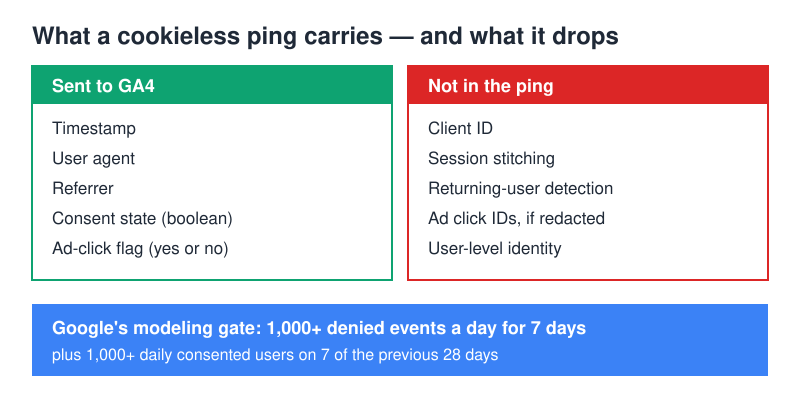
What travels inside it, per Google’s documentation: a timestamp, the user agent (web only), the referrer, boolean information about the consent state, and an indication of whether the current page or a prior page in the visitor’s navigation included ad-click information in the URL. Google lists a random page-load number and the consent platform’s developer ID alongside those. Nothing on that list identifies a person, or ties one request to the next.
What’s absent is more instructive. There’s no client ID, so GA4 cannot tell that page view #2 came from the same browser as page view #1. Every hit is an island. In practice this inflates first_visit and session_start counts. Google states it plainly: “If users do not grant consent for Analytics to associate a persistent user identifier with them, Analytics can’t detect if the events are the action of the same user. That results in a higher number of first_visit and session_start events for those users, because the event is sent each time they load a page.”
You can watch this happen. Open GTM Preview alongside GA4’s DebugView, load a page, reject the banner. The tag still fires — Tag Assistant lists it — but the hit either won’t surface in DebugView or arrives detached from your debug session, because DebugView keys on the identifier that no longer exists. That mismatch is hands-on proof that a ping left the browser while the cookie did not.
| No Consent Mode | Consent Mode — Basic | Consent Mode — Advanced | |
|---|---|---|---|
| Sent when user denies | Nothing (tag blocked) or everything (tag unblocked, non-compliant) | Nothing — tags don’t load until the banner is answered | Cookieless ping: timestamp, user agent, referrer, consent state, ad-click flag |
| Modeling available | No | No | Yes, above the volume thresholds |
| What reports show | Consenting users only | Consenting users only | Consenting users plus modeled estimates, on the Blended reporting identity |
| BigQuery export | Consented events only | Consented events only | Cookieless pings are exported; modeled data is not |
| Google Ads impact | Conversions from deniers are lost outright | Conversions from deniers are lost outright | Conversion modeling can recover part of the gap |
| Tag load timing | Tags fire on page load | Tags deferred until banner interaction | Tags fire on page load, before the choice |
Six steps in Google Tag Manager. Order matters — it’s the part people get wrong.
Step 1 — Set defaults to denied on the Consent Initialization trigger. In GTM, create a tag that sets the default consent state and attach it to the built-in Consent Initialization — All Pages trigger, not All Pages. Consent Initialization fires ahead of every other trigger, which guarantees your defaults land before the GA4 tag builds its first request. Set ad_storage, analytics_storage, ad_user_data and ad_personalization to denied. Those four are the consent parameters Google’s tag platform reads.
Step 2 — Wire a certified CMP to send the update. Defaults are half the handshake. When the visitor clicks, the CMP must issue an update command flipping the relevant parameters to granted. Certified CMPs ship a GTM template that does this — install it, point it at your CMP account, and don’t hand-roll the update call unless you enjoy debugging race conditions.
Step 3 — Turn on ads_data_redaction. With ad_storage='denied' and redaction enabled, “ad click identifiers sent in network requests by Google Ads and Floodlight tags will be redacted” and those requests get sent through a domain without third-party cookies. You lose click-level ad detail for deniers — you were never entitled to it — and you keep the aggregate signal that feeds modeling.
Step 4 — Turn on url_passthrough. With storage denied there’s no cookie to remember which ad brought the visitor in. Passthrough appends the click parameters Google lists for the feature — gclid, dclid, gclsrc, wbraid, _gl — to internal links so the information survives navigation across pages on the same domain. Without it, a denier who lands on your ad page and converts a few pages later shows up as direct traffic.
Step 5 — Check consent settings on every tag. GTM lets each tag declare which consent types it requires. Built-in checks cover Google tags, but any custom HTML or third-party pixel needs an additional consent required entry. One unguarded pixel undoes the whole setup.
Step 6 — Switch reporting identity to Blended. In GA4 Admin, under data display, set reporting identity to Blended. It’s the option that goes “By User-ID, device ID, then modeling” — if no identifier is available, Analytics uses modeling. Observed stops at the device ID. Leave it on Observed and you’ll never see a modeled number, however correct your GTM work is.
How do you verify it’s actually working?
Four checks, from fastest to slowest.
Tag Assistant / GTM Preview. Load the page in preview and look at the Consent tab before touching the banner. Every parameter should read denied. Click accept and confirm the state flips to granted in the same session — no page reload required. If it only flips after a reload, your CMP update is firing too late.
Network request inspection. With the banner rejected, filter the network panel for the GA4 collect request. It should still be there. If nothing goes out, you’re on basic mode, not advanced, and no amount of waiting produces modeled data.
GA4 Consent settings. Admin → Data collection and modification → Consent settings shows the status of your advertising and behavior-analytics signals, and at the top of the page you “may see the percentage of your website traffic and conversions coming from the EEA”. Google warns it “may take 48-72 hours for the notifications to update”, so don’t panic-debug the afternoon you deploy.
The thresholds. Modeling doesn’t start because you enabled something. It starts when the property has at least 1,000 events per day with denied analytics storage for at least 7 days, and at least 1,000 daily users sending events with granted storage on at least 7 of the previous 28 days. Google is explicit that meeting the numbers doesn’t guarantee a model — it “may take more than 7 days of meeting the data threshold within those 28 days to train the model successfully; however it’s possible that even the additional data won’t be sufficient for Analytics to train the model.” Modeled figures also lag, so yesterday’s report may show none.
Once a model exists, you’ll see it in standard reports on the Blended identity, and in explorations that use event-scoped dimensions. If your numbers don’t move after a few weeks above threshold, the model didn’t train — a documented outcome, not a misconfiguration.
What can’t you recover?
This is the section vendors skip. Modeling estimates aggregates. It does not resurrect people.
User-level data is gone permanently. No client ID means no user journey, no returning-visitor flag, no user-scoped custom dimension for anyone who declined. Google’s own list of what doesn’t use modeled data starts with User Explorer, cohort and user-lifetime explorations.
BigQuery gets the pings but never the model. This surprises people in both directions. Cookieless pings collected under consent mode are present in the BigQuery export — so you’ll find rows for denied hits, just without the identifiers that make them joinable. Modeled data never lands there at all, which means your warehouse totals legitimately sit below the GA4 interface. Before reconciling the two, read the GA4 BigQuery export explained — the schema shows which fields go null.
Remarketing pools shrink. Audiences don’t accept modeled data. Every denier is excluded from every behavioral audience you build, so list sizes drop in proportion to your reject rate. Plan campaign scale around your consented population, not your total traffic — the same caveat applies to anything covered in GA4 audiences.
Path-level attribution breaks. Multi-touch models need the same identifier across sessions. Deniers don’t have one, so their touchpoints can’t be sequenced. Segments containing sequences exclude modeled data, and retention reports and predictive metrics don’t use it either.
What you keep: aggregate trends, channel performance, event counts, and a conversion total closer to reality than the consented-only number. For most reporting decisions that’s enough. For anything needing one user’s history, it isn’t — and no configuration changes that.
When is server-side tagging the better answer?
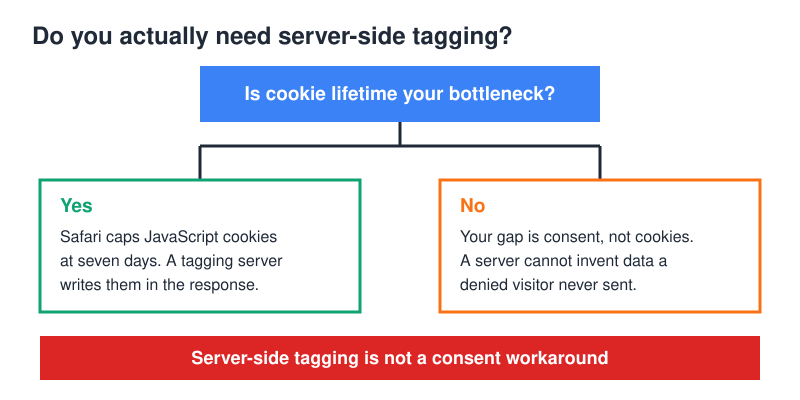
Server-side GTM solves exactly one of the three problems above — cookie lifetime — and gives you control over what leaves your infrastructure.
The mechanism is simple. A cookie written by JavaScript is capped at seven days on Safari. A cookie written by your tagging server in the HTTP response isn’t set by JavaScript, so it escapes that cap. If a meaningful slice of your audience uses Safari and your buying cycle runs longer than a week, that’s a real fix, not a marketing claim.
Two conditions attached. First, the tagging server has to run in real first-party context — your own subdomain, properly configured. Safari also caps the expiry of cookies set in third-party CNAME-cloaked HTTP responses to 7 days, so sloppy DNS lands you back where you started. Second — the part people pay for and then discover — server-side tagging does not change consent. A visitor who denied storage denied it everywhere.
When is it overkill? When your reject rate is the bottleneck rather than cookie expiry. When nobody on the team can own a cloud container, watch its cost, and debug it when requests stop arriving. And when your volume sits below the modeling thresholds — under 1,000 denied events a day, none of this moves a number you’d act on. Fix the banner’s opt-in rate first; cheaper, bigger effect. For how these pieces fit together, the complete web analytics tracking guide maps the full stack.
FAQ
No. Consent Mode doesn’t provide a banner and doesn’t replace one — it reads the choice your banner collects and adjusts tag behavior accordingly. Advanced mode fires tags before the visitor decides, which makes a correctly configured denied default mandatory rather than optional. Remove the banner and you have no lawful basis at all.
How much traffic do I need before GA4 starts modeling conversions?
Google’s documented prerequisites are at least 1,000 events per day with analytics storage denied for at least 7 days, plus at least 1,000 daily users sending events with storage granted on at least 7 of the previous 28 days. Hitting those numbers makes you eligible, not guaranteed — the model still has to train successfully.
Partly. Conversion modeling plus url_passthrough recovers some of the gap by keeping click information alive across pages when no cookie can store it. It won’t return you to pre-consent numbers, and it does nothing for the deniers you’ve lost from remarketing audiences, which don’t accept modeled data.
Is modeled data accurate enough to make decisions on?
For trends, channel comparisons and aggregate conversion counts, yes — that’s what it’s built for. For anything user-level it isn’t available in the first place. Treat modeled totals as a better estimate than consented-only totals, keep your BigQuery export as the observed-only baseline, and never present the two as the same number.
Cookieless tracking in GA4 is a recovery mechanism with a published price list. Set defaults to denied, wire a certified CMP, enable redaction and passthrough, switch to Blended, then measure what comes back. The setups that disappoint expected a replacement for cookies. The ones that work treat modeling as partial compensation and build reporting around the honest gap.

About the Author
Tom Bradley
Marketing analyst with 8+ years in web analytics. I’ve completed 150+ GA4 implementations and helped 50+ brands turn data into growth strategies. Every guide on Viewing comes from real projects and real problems I’ve solved.