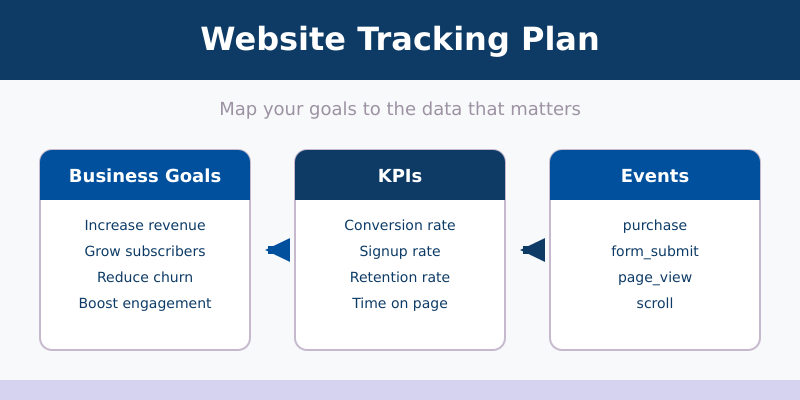
You’re collecting data — but do you know why you’re collecting it? Most websites track everything by default and end up with cluttered reports full of data nobody uses. A tracking plan fixes this. It’s a single document that maps your business goals to the specific events, metrics, and parameters you need to measure. This guide shows you how to build one from scratch.
I’ve created tracking plans for over 50 websites — e-commerce stores, SaaS marketing sites, content blogs, and lead generation pages. The ones that had a plan before implementation always ended up with cleaner data, faster reporting, and fewer “why isn’t this tracked?” moments six months later.
What Is a Tracking Plan?
A tracking plan (also called a measurement plan) is a structured document that defines exactly what data your website collects, why it collects it, and how each data point connects to a business goal.
Think of it as a blueprint. You wouldn’t build a house without architectural drawings. You shouldn’t set up analytics without a tracking plan.
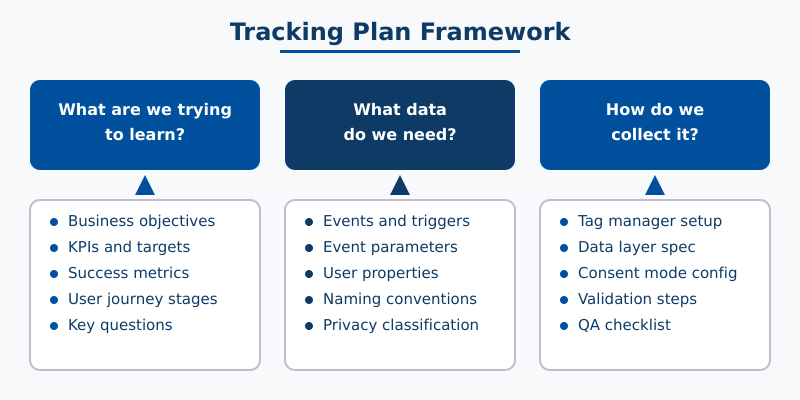
A good tracking plan answers three questions:
- What are we trying to learn? — Business questions and goals
- What data do we need? — Events, parameters, and metrics
- How do we collect it? — Implementation details and tools
Without a tracking plan, teams typically fall into two traps: tracking too little (missing critical interactions) or tracking too much (drowning in noise). Either way, the data doesn’t answer the questions that matter.
Why You Need a Tracking Plan Before Writing Any Code
Most analytics implementations start backwards. Someone installs a tracking tool, turns on default settings, and hopes the reports will be useful. They rarely are.
A tracking plan prevents these common problems:
| Problem | Without a Tracking Plan | With a Tracking Plan |
|---|---|---|
| Missing data | Discover gaps months later when someone asks for a report | Every business question has a mapped data source from day one |
| Inconsistent naming | btn_click, button-click, ButtonClick across different pages | One naming convention used everywhere |
| Wasted effort | Developers implement tracking without knowing what matters | Clear spec for each event — no guessing |
| Privacy risks | PII accidentally collected in URLs or form fields | Privacy requirements defined upfront for each data point |
| Stakeholder confusion | “What does this metric even mean?” | Shared definitions, agreed upon before launch |
The tracking plan is also a communication tool. It aligns marketing, development, and leadership around what “success” means in data terms. When everyone agrees on what to track before implementation, you avoid endless revision cycles later.
Step 1 — Define Your Business Objectives and KPIs
Start with the big picture, not the technical details. What does your website exist to do? What would “success” look like in 6 months?
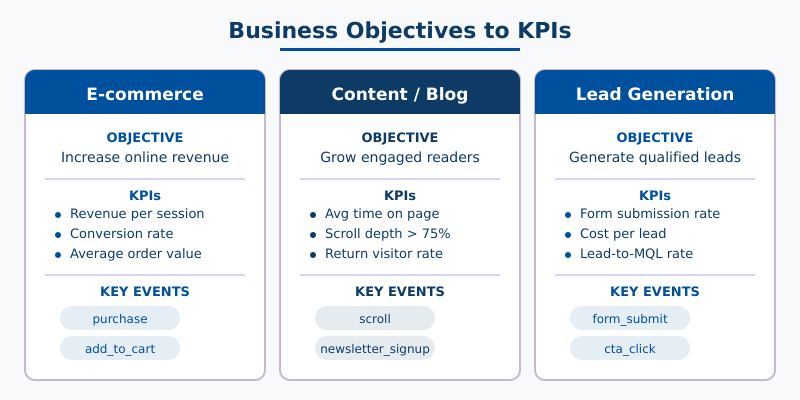
Write down 3-5 business objectives. Then for each objective, identify 1-3 key performance indicators (KPIs) that would tell you whether you’re achieving it.
Here’s how this looks for different website types:
| Website Type | Business Objective | KPI |
|---|---|---|
| E-commerce | Increase online revenue | Revenue per session, conversion rate, average order value |
| E-commerce | Reduce cart abandonment | Cart abandonment rate, checkout completion rate |
| Content / Blog | Grow engaged readership | Average time on page, scroll depth, return visitor rate |
| Content / Blog | Drive newsletter signups | Signup conversion rate, signups per article |
| Lead Generation | Generate qualified leads | Form submission rate, cost per lead, lead-to-MQL rate |
| SaaS Marketing | Drive trial signups | Trial signup rate, demo request rate, activation rate |
Pro tip: If you can’t explain why a KPI matters in one sentence, it probably isn’t a real KPI. “Pageviews” is a metric, not a KPI — unless your revenue model is ad-based.
Don’t overthink this step. You’re not committing to anything permanent — tracking plans evolve. But starting with clear objectives prevents the most common mistake: tracking data you’ll never use.
Step 2 — Map Your User Journey
Now that you know what to measure, figure out where it happens. Walk through your website as a user would, from first arrival to final conversion.
For most websites, the journey follows a similar pattern:
- Acquisition — How do users find your site? (Organic search, paid ads, social, referrals)
- Engagement — What do they do on your site? (Read content, browse products, watch videos)
- Conversion — Do they complete the desired action? (Purchase, signup, form submission)
- Retention — Do they come back? (Return visits, repeat purchases, newsletter engagement)
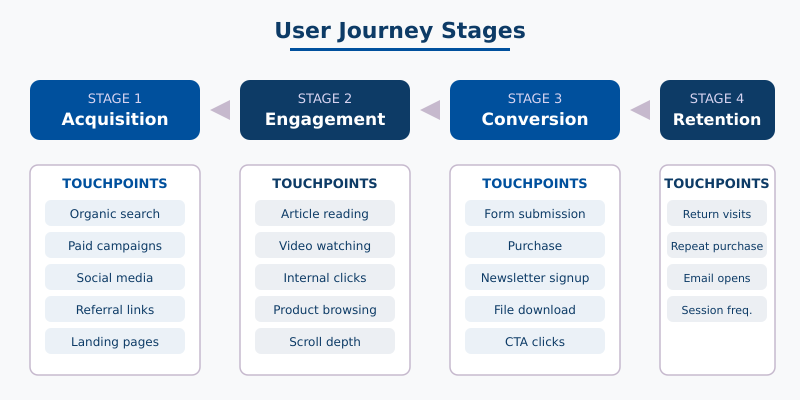
For each stage, identify the key touchpoints — the specific pages, interactions, or moments that matter. These become the events in your tracking plan.
Here’s a practical example for a content website:
| Journey Stage | Touchpoints | What to Track |
|---|---|---|
| Acquisition | Landing pages, UTM-tagged campaigns | Traffic source, landing page, campaign parameters |
| Engagement | Article reading, video watching, internal navigation | Scroll depth, time on page, video plays, internal clicks |
| Conversion | Newsletter signup, contact form, resource download | Form submissions, download clicks, CTA interactions |
| Retention | Return visits, multiple article reads | Return visitor flag, pages per session, session frequency |
This mapping exercise usually reveals gaps. You might realize you have no way to tell whether blog readers actually finish your articles, or whether your pricing page visitors are comparing plans. Those gaps become items in your tracking plan.
Step 3 — Build Your Event Inventory
This is the core of the tracking plan. For each touchpoint from Step 2, define the specific events and parameters you need to capture.
An event has three components:
- Event name — What happened (e.g.,
form_submit,video_play,cta_click) - Event parameters — Context about what happened (e.g.,
form_name,video_title,button_text) - User properties — Persistent attributes about the user (e.g.,
membership_tier,signup_date)
Here’s a tracking plan inventory for a content website. I’m using a naming convention of object_action in lowercase with underscores — pick a convention and stick with it across every event.
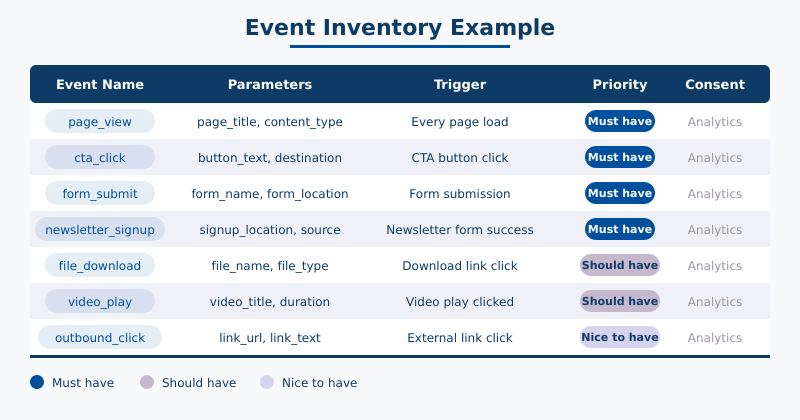
| Event Name | Parameters | Trigger | Priority |
|---|---|---|---|
page_view | page_title, page_location, content_type | Every page load | Must have |
scroll | percent_scrolled (25, 50, 75, 90) | User scrolls past threshold | Must have |
cta_click | button_text, button_location, destination_url | Click on any CTA button | Must have |
form_submit | form_name, form_location | Successful form submission | Must have |
newsletter_signup | signup_location, lead_source | Newsletter form submitted | Must have |
file_download | file_name, file_type | Click on download link | Should have |
video_play | video_title, video_duration | Video play button clicked | Should have |
video_complete | video_title, video_duration | Video reaches 100% | Nice to have |
outbound_click | link_url, link_text | Click on external link | Nice to have |
search | search_term | Site search submitted | Should have |
Notice the Priority column. Not every event is equally important. Prioritizing helps developers know what to implement first and prevents scope creep. I use three levels:
- Must have — Directly tied to a KPI. Without this data, you can’t measure success.
- Should have — Provides valuable context but isn’t critical for core reporting.
- Nice to have — Useful for deep analysis. Implement after the essentials work.
If you’re setting up event tracking in GA4, many of these events are already collected automatically or through enhanced measurement. Your tracking plan should note which events need manual implementation and which are already handled.
Step 4 — Add Naming Conventions and Governance Rules
Inconsistent naming is the fastest way to ruin a tracking plan. If one developer names an event button_click and another uses btn-click, you’ll end up with fragmented data that’s impossible to aggregate.
Set these rules before anyone writes a line of code:
Event naming convention:
- Use
snake_case(lowercase with underscores):form_submit, notformSubmitorForm-Submit - Follow
object_actionformat: the thing being acted on comes first (video_play,cart_add,form_submit) - Keep names under 40 characters
- Never include dynamic values in event names — use parameters instead. (
cta_clickwith abutton_textparameter, notcta_click_buy_now)
Parameter naming convention:
- Same
snake_caseformat - Use descriptive names:
form_nameinstead offn - Reuse parameter names across events where the concept is the same (e.g.,
page_locationshould mean the same thing everywhere)
Governance rules:
- One person owns the tracking plan (usually a marketing analyst or product manager)
- Review the plan quarterly — remove events nobody uses, add new ones for new features
- Any new event must be added to the plan before implementation
- Version the document — date each change so you know when events were added or modified
Step 5 — Plan for Privacy and Consent
This is the step most tracking plans skip entirely — and it’s the one that causes the biggest headaches later.
Every event in your tracking plan needs a consent classification. Under GDPR, ePrivacy, and similar regulations, you must know which data requires user consent and which doesn’t.
Classify each event into one of three categories:
| Consent Category | What It Covers | Example Events |
|---|---|---|
| Strictly necessary | Essential for the site to function — no consent required | Login tracking, cart functionality, session management |
| Analytics | Understanding site usage — requires consent in most EU jurisdictions | page_view, scroll, video_play, form_submit |
| Marketing | Advertising and remarketing — always requires consent | Conversion pixels, remarketing tags, ad platform events |
For each event in your inventory, add a column that specifies:
- Consent category — Strictly necessary, analytics, or marketing
- PII risk — Does this event capture any personally identifiable information?
- Consent mode behavior — What happens when the user denies consent? (Event blocked entirely, or sent without cookies?)
Planning this upfront means your developers can implement consent mode correctly from the start, instead of retrofitting it after a compliance audit.
Step 6 — Create the Implementation Spec
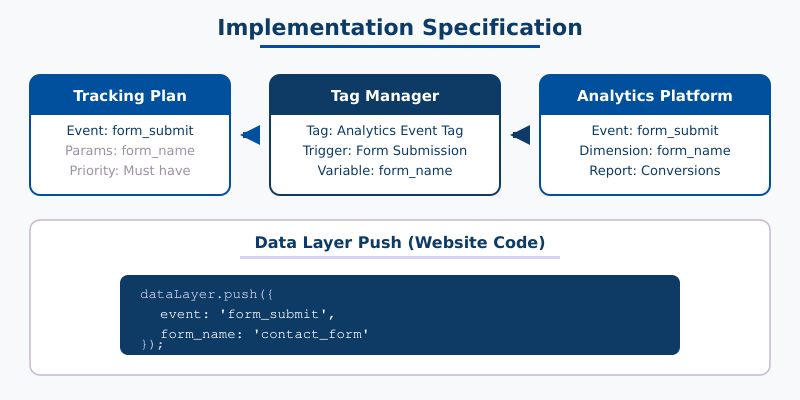
The final step bridges your tracking plan to the actual code. For each event, document how it will be implemented technically.
If you’re using a tag manager, this means specifying the tag, trigger, and variables. If you’re using hard-coded tracking, this means the exact JavaScript calls.
Here’s an example implementation spec for a few events:
| Event | Implementation Method | Data Source | Validation |
|---|---|---|---|
page_view | Automatic (analytics platform) | Built-in | Check real-time reports |
cta_click | Tag manager — click trigger with CSS selector | Click element attributes | Tag manager preview mode |
form_submit | Tag manager — form submission trigger or custom event | Data layer push from form plugin | Submit test form, verify in debug view |
newsletter_signup | Tag manager — custom event from form success callback | dataLayer.push({event: 'newsletter_signup'}) | Complete signup flow, check data layer |
scroll | Automatic (enhanced measurement) | Built-in | Scroll page, check real-time report |
The Validation column is critical. Every event needs a test plan. How will you confirm it fires correctly? The best approach is to test each event immediately after implementation — not weeks later when you notice gaps in your reports.
If you’re tracking e-commerce events, the implementation spec becomes especially important. E-commerce tracking involves complex data layer requirements with product arrays, transaction details, and currency values — all of which need clear documentation.
Tracking Plan Template
Here’s the structure I use for every tracking plan. You can recreate this in any spreadsheet tool — Google Sheets, Excel, Notion, or Airtable.
Tab 1: Business Objectives
| Objective | KPI | Target | Measurement Frequency |
|---|---|---|---|
| Increase newsletter subscribers | Monthly signups | 500/month | Weekly |
| Improve content engagement | Average scroll depth | >75% | Monthly |
| Grow organic traffic | Organic sessions | +20% QoQ | Monthly |
Tab 2: Event Inventory
| Event Name | Category | Parameters | Trigger | Priority | Consent |
|---|---|---|---|---|---|
cta_click | Engagement | button_text, page_location | CTA button click | Must have | Analytics |
form_submit | Conversion | form_name, form_location | Form submission success | Must have | Analytics |
newsletter_signup | Conversion | signup_location | Newsletter form success | Must have | Analytics |
Tab 3: Implementation Spec
| Event Name | Method | Data Source | Owner | Status | Validation |
|---|---|---|---|---|---|
cta_click | Tag manager | Click attributes | Dev team | Not started | Preview mode click test |
form_submit | Tag manager + data layer | dataLayer.push() | Dev team | Not started | Submit test, check debug view |
newsletter_signup | Tag manager + custom event | Form success callback | Dev team | Not started | Complete signup, verify event |
This template scales from a 10-event blog to a 100-event e-commerce store. Start with the essentials and expand as your analytics maturity grows.
Common Mistakes to Avoid
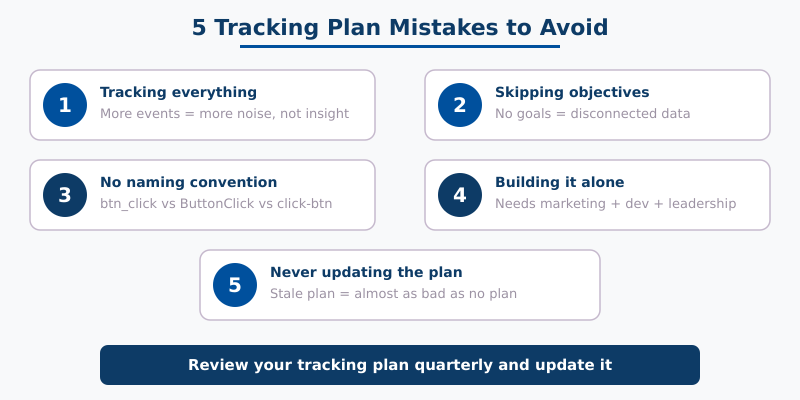
After reviewing dozens of tracking plans (and fixing quite a few broken ones), these are the mistakes I see most often:
1. Tracking everything “just in case”
More events isn’t better. Every event you track costs implementation time, maintenance effort, and cognitive load when reviewing reports. If you can’t connect an event to a business objective, don’t track it.
2. Skipping the business objectives step
Jumping straight to “what events should I track” leads to a disconnected mess. The objectives filter is what makes a tracking plan useful — it tells you what not to track as much as what to track.
3. No naming convention
Three months after launch, you’ll have click_cta, CTA_Click, and cta-button-clicked in your reports. Pick a convention on day one. I recommend object_action in snake_case.
4. Building the plan in isolation
The tracking plan needs input from marketing (what questions need answering), development (what’s technically feasible), and leadership (what success looks like). A plan built by one person in a vacuum rarely survives contact with reality.
5. Treating the plan as a one-time project
Websites change. New pages get added, campaigns launch, business priorities shift. Review your tracking plan quarterly and update it. A stale tracking plan is almost as bad as no plan at all.
FAQ
How long does it take to create a tracking plan?
For a simple website (blog or small business site), expect 2-4 hours to create a solid tracking plan. For complex e-commerce or SaaS sites with multiple conversion funnels, budget 1-2 days. The time you invest upfront saves weeks of debugging and rework later.
What tools should I use to create a tracking plan?
Google Sheets or Excel work best for most teams. They’re collaborative, version-trackable, and don’t require learning a new tool. Some teams use Notion or Airtable for larger projects. Avoid building it in a document — the tabular format of a spreadsheet is much easier to maintain and reference.
How many events should a tracking plan include?
There’s no magic number, but most websites need 10-30 custom events. A simple blog might need 8-12. A large e-commerce store might need 40-50. Start with your “must have” events tied to business KPIs, then expand to “should have” events once the essentials are validated.
Should I create a tracking plan for an existing website?
Yes. Audit what you’re currently tracking, map it to business objectives, identify gaps and redundancies, then create the plan. This is called a tracking audit, and it often reveals events that fire incorrectly, missing data, or tracking that serves no purpose. Retroactive plans are just as valuable as upfront ones.
Do I need a tracking plan if I only use basic analytics?
Even with just a basic analytics setup, a lightweight tracking plan helps. At minimum, document your business objectives, the 5-10 most important events, and your naming convention. As your analytics needs grow, you’ll have a foundation to build on instead of starting from scratch.
Next Steps
A tracking plan is only useful if it gets implemented. Here’s how to move forward:
- Create your spreadsheet using the template structure above — start with 3-5 business objectives
- Map your user journey and identify the key touchpoints at each stage
- Build your event inventory — focus on “must have” events first
- Get stakeholder buy-in — share the plan with marketing, dev, and leadership
- Implement and validate — set up each event and test it before moving to the next
If you’re ready to start implementing, check out the step-by-step guide to event tracking for the technical setup. For e-commerce sites, the e-commerce tracking setup guide covers the specific events and parameters you’ll need.
The best tracking plan is the one that actually gets built. Start simple, document everything, and iterate. Your future self — and your stakeholders — will thank you for it.

About the Author
Tom Bradley
Marketing analyst with 8+ years in web analytics. I’ve completed 150+ GA4 implementations and helped 50+ brands turn data into growth strategies. Every guide on Viewing comes from real projects and real problems I’ve solved.